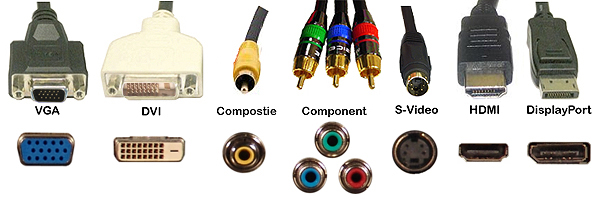
Understanding Different Types of Monitor Cables: A Comprehensive Guide
Understanding the different types of monitor cables is crucial for optimal performance of your display. Monitor cables come in various types, each designed to support specific resolutions and refresh rates. The most common types include HDMI, DVI, VGA, and DisplayPort. For instance, while HDMI cables are widely used in consumer electronics and support both video and audio transmission, DVI cables are primarily focused on video output and are commonly found in older monitors. It's important to choose the right cable type that matches your monitor's specifications to ensure you achieve the best possible image quality.
In addition to the basic types, there are also variations within these categories, such as mini DisplayPort and micro HDMI, designed for more compact devices. Furthermore, the choice of cable can impact not just the visual clarity but also features like 4K compatibility and adaptive sync technologies. To help you make an informed decision, here's a quick comparison:
- HDMI: Versatile, supports up to 4K resolution.
- DVI: Great for legacy devices, but limited to video.
- VGA: Older technology, best for basic displays.
- DisplayPort: High-performance, ideal for gaming and professional workstations.
If you're looking to declutter your workspace, exploring the Top 10 Cable Management Solutions for Monitors can provide you with practical options that enhance both aesthetics and functionality. These solutions help organize messy wires, prevent tangling, and create a more efficient work environment. From cable clips to sleek under-desk trays, each product offers unique benefits for any setup.
How to Choose the Right Monitor Cable for Your Setup
Choosing the right monitor cable for your setup is essential to ensure optimal performance and visual quality. The first step is to identify the type of ports available on both your monitor and your computer. Common connection types include HDMI, DisplayPort, and DVI. Each type offers different capabilities, such as maximum resolution and refresh rates. If your graphics card supports it, DisplayPort is typically favored for its superior bandwidth and ability to support higher resolutions and refresh rates. In contrast, HDMI is more widely used for TVs and gaming consoles. Consider your specific needs and compatibility when selecting a cable.
Next, consider the length and quality of the monitor cable. A cable that is too short may restrict your setup options, while an excessively long cable can result in signal degradation. Opt for a cable that comfortably reaches your devices without excessive slack. Additionally, investing in high-quality cables can make a significant difference in overall performance. Look for cables that are well-shielded to minimize interference and those with gold-plated connectors for better connectivity. By carefully selecting the right cable, you can enhance your viewing experience and ensure that your setup meets your performance expectations.
Common Monitor Cable Issues and How to Troubleshoot Them
When it comes to monitor cables, several common issues can disrupt your viewing experience. One of the most prevalent problems is signal loss, which often manifests as flickering images or a complete inability to display anything at all. This issue can arise from loose connections or damage to the cable itself. To troubleshoot, first, ensure that the cable is securely connected to both the monitor and the computer. If the connections are tight and the problem persists, inspect the cable for any visible signs of wear or fraying, and consider testing it with another monitor to isolate the issue.
Another typical concern is compatibility between different types of monitor cables. For example, HDMI, DVI, and VGA all serve the same purpose but may not work interchangeably. If your monitor is not displaying any image, check that your computer's graphics output supports the cable you're using. Often, an adapter can be a quick solution if the connections differ. Also, ensure that you have selected the correct input source on your monitor’s settings menu. By addressing these potential problems, you can greatly enhance your troubleshooting efforts and maintain an efficient workspace.